 Professional Password Recovery/Rescuer Software, Data Recovery/Rescuer Software
Professional Password Recovery/Rescuer Software, Data Recovery/Rescuer Software
Professional Password Recovery/Rescuer Software, Data Recovery/Rescuer SoftwareRar archive password is generally thought to be one of the most difficult problem in the password decryption field. In fact, it is kind of exaggerated. This page shows how to remove password from WinRAR or RAR archive. To be frank, it seems to be a bit troublesome especially you made the password quite long and complicated. But we won’t say "give up" easily. Let’s get started.
Step 1: Download and install RAR Password Rescuer which can help you remove or recover the lost password.

Step 2: Launch the software utility and click the open files button in the top left field. Then search for and double click the *.RAR file whose password you forgot and want to remove.
Step 3: Select a proper option in the type of attack drop-down list. If you still remember part of your password, you had better choose Mask. If not, any rest one is ok.
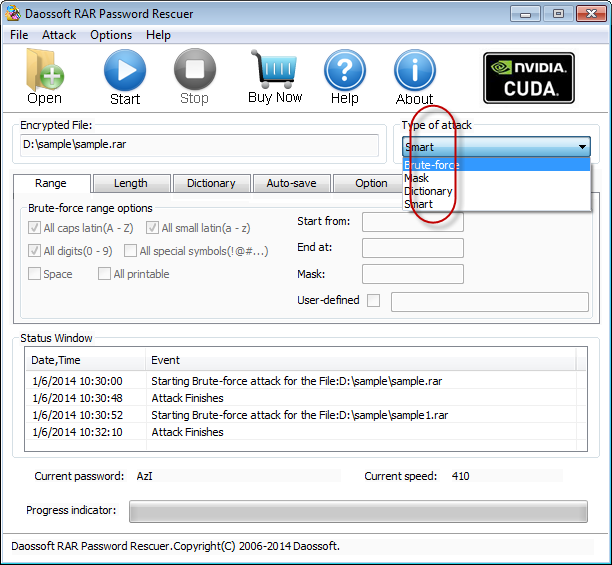
Step 4: Click on the Start button or click Attack and then Start.
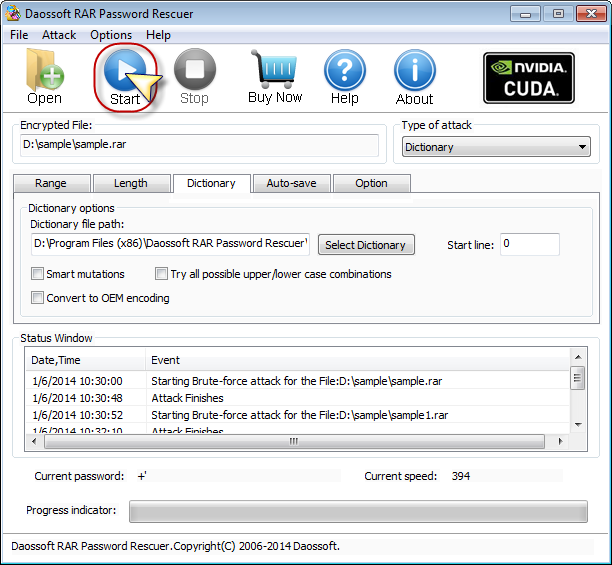
(Decrypting RAR password… Please wait…)
Note: How long it will take depends on the length or complexity of your password. The longer or more complicated the password is, the more time will be taken.
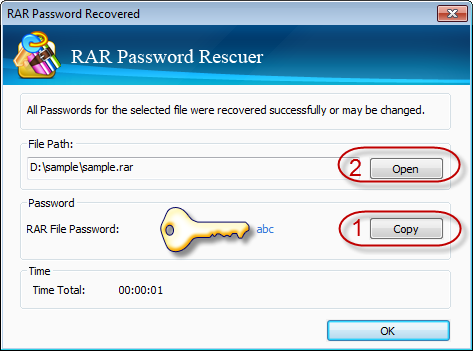
Step 5: Once the password decryption is finished, the program will pop up a message telling you that it has got the forgotten password back resoundingly. And what you need to do next is to write down the password. Besides, you can also click Copy and then the Open button.
That’s all. May it help you!

